Menu
×
  • Main
  • Home
  • Network Monitoring Software
  • Application Monitoring Software
  • Bandwidth Monitoring Software
  • Syslog Servers
  • TFTP Servers
  • Event Log Analysis Software
  • Help Desk Software
  • IPAM Software
  • Netflow Analyzers and Collectors
  • Network Configuration Management Software
  • VN Manager & Monitoring Software
  • Wake On Lan Tools
  • Info & Contact
  • Contact
  • Terms of Use
  • Privacy Policy
  • Disclaimer
  • Legal
  • © 2016 NetAdminTools.com
    All Rights Reserved

Network Admin Tools

  • Home
  • Monitoring
  • Backup/Recovery
  • GNU/Linux
  • Administration
  • Perl
  • Ruby
  • Database

Our readers provide the funding for our platform, and we may receive a commission when you make a purchase using the links on our site.

Software RAID on Windows 2003 – Part1

Last Updated: May 5th, 2017 - Paul Anderson

By Paul Anderson / May 5, 2017 — Backup/Recovery

There are 5 parts to this article:
Part1 – Part2 – Part3 – Part4 – Part5

This series of articles will show how to set up software RAID on a Windows Server 2003 system. Before you do anything with your disks, make sure you have a good backup. Please read our terms of use. We will start with one Basic drive, create a RAID1 set on a new drive we install, remove the first drive, and recover from the second. We wrote up an article over seven years ago here about Windows Server software RAID, and it is definately time to provide an update. First off, we have a single 12 gig drive running in Basic mode:
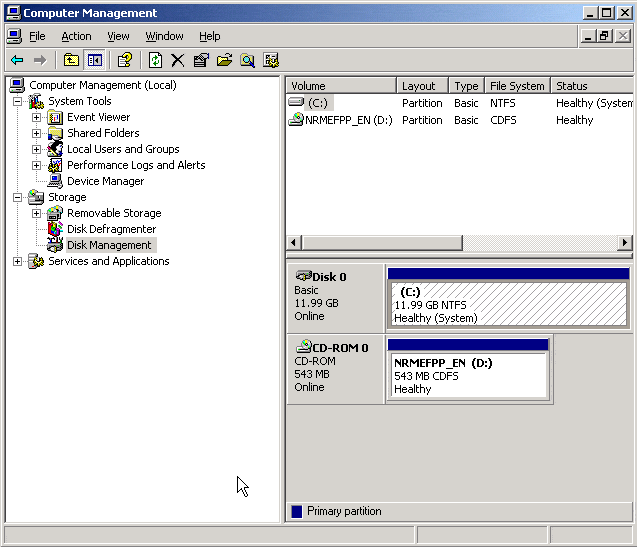
1

To run Software RAID, you need to convert this drive to a Dynamic Disk. Note that on Windows Server 2003 this is possible after installing the disk as Basic. To convert to a Dynamic Disk, simply right-click on the drive and select Convert to Dynamic Disk:
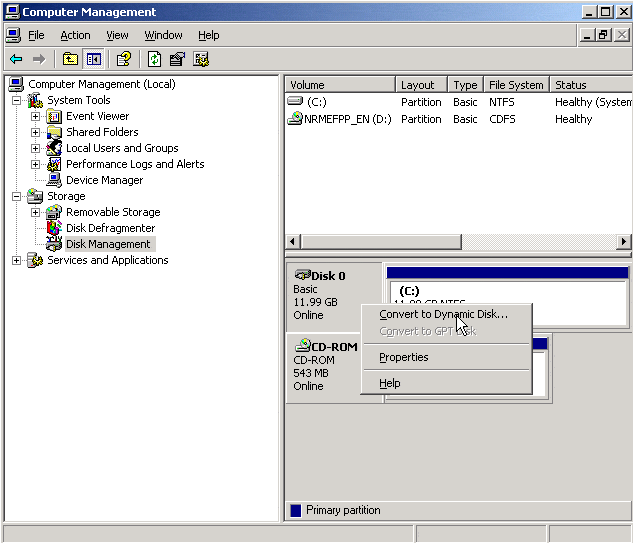
2

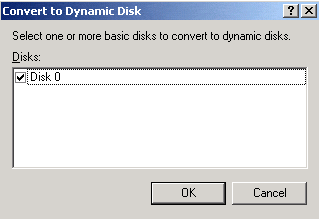
Check the disk you wish to convert:

3

Confirm which disks you want to convert to Dynamic:
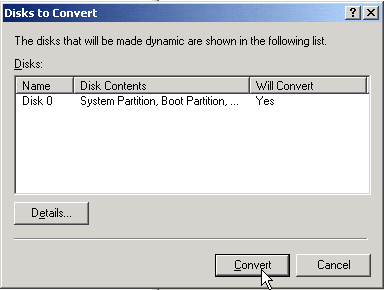
4

You will be warned that converting this disk drive will limit the ability of other operating systmes to start for any volumes on the disk.
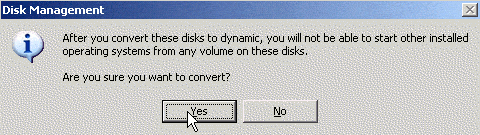
5

There are 5 parts to this article:
Part1 – Part2 – Part3 – Part4 – Part5

 

>> Manage your Hardware & Network with and Enterprise-Class Management Platform and Keep an eye on all Metrics all the Time!

Paul Anderson
  • Twitter

Paul is an Avid Tech Geek who Loves writing, Cycling and All Things Linux! He comes from a Background of Windows Administration along with Ubuntu/Centos Server administration. Paul holds industry wide certifications include CompTIA & Microsoft Accredited certifications.

Search

Must Read Resources

  • WHITE PAPER
    Network Management Software Buyers Guide
  • WHITE PAPER
    GNS3 Network Emulator Training
  • WHITE PAPER
    Netflow Best Practices
  • WHITE PAPER
    Learn how to Analyze Packet with Deep Analysis
  • WHITE PAPER
    How to Find your Highest Bandwidth Users
Network Admin Tools
Network Admin Tools

Categories

  • Active Directory
  • Administration
  • Backup/Recovery
  • BSD
  • Bugs and Fixes
  • Certification
  • Comparisons
  • Database
  • Desktop
  • DIY
  • Email
  • ERP
  • File/Print
  • GIAGD
  • GNU/Linux
  • GNU/Linux Dictionary
  • Hardware
  • Information Grab Bag
  • Interoperability
  • Monitoring
  • Name Resolution and DNS
  • Network Management Software
  • Network Services
  • Networking
  • Perl
  • REALbasic
  • Remote Control
  • Ruby
  • Security
  • Software
  • Solaris
  • Syslog Servers
  • TFTP Server
  • Uncategorized
  • Web
Network Admin Tools
Network Admin Tools

Information

  • Contact
  • Privacy Policy
  • Terms of Use
  • Disclaimer
  • Legal

About

  • About Us
  • Contribute
  • Staff/Authors

© 2026 Network Admin Tools · Powered by Leanpress