
Here is a diagram of three servers:
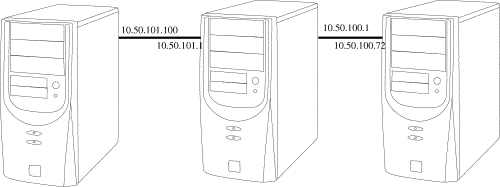
What we want to do is create a tunnel with SSH so that 10.50.101.100 can go directly to 10.50.100.72.
There is no routing between the networks. The box in between is dual-homed and acting as a security buffer between the 10.50.100 and 10.50.101 networks.
After we set up the tunnel, we are going to perform an rsync backup of the 10.50.100.72 /share directory to 10.50.101.100.
To set up the tunnel, login in via SSH using the command line or a ssh client software similar to PuTTY.exe :
# ssh -l root -L 839:10.50.100.72:22 10.50.101.1 cat - |
If there are no keys, you will have to enter passwords.
The cat – just keeps the tunnel open by running a command that never quits.
You have to run this from a shell, and you can’t put it in the background.
To make this easier, we will set up keys:
# ssh-keygen -t dsa Generating public/private dsa key pair. Enter file in which to save the key (/root/.ssh/id_dsa): Enter passphrase (empty for no passphrase): Enter same passphrase again: Your identification has been saved in /root/.ssh/id_dsa. Your public key has been saved in /root/.ssh/id_dsa.pub. The key fingerprint is: f0:50:6e:7b:a8:ce:c2:d9:13:2d:6b:f5:ab:ff:e9:0f root@mcj |
Copy the key to 10.50.100.72 directly using the tunnel:
# scp -P 839 /root/.ssh/id_dsa.pub root@localhost:/root/.ssh/101pub root@localhost's password: id_dsa.pub 100% 598 0.6KB/s 00:00 # |
On 10.50.100.72:
# cat 101pub >> authorized_keys2 |
Copy the key to the gateway box (10.50.101.1):
# scp /root/.ssh/id_dsa.pub root@10.50.101.1:/root/.ssh/101pub root@10.50.101.1's password: id_dsa.pub 100% 598 0.6KB/s 00:00 # |
This box needs a new authorized_keys2 file, so we need to create it and change the permissions:
# cat 101pub > /root/.ssh/authorized_keys2 # # chmod 600 /root/.ssh/authorized_keys2 # |
Let’s restart the tunnel with debugging turned on:
# ssh -l root -vL 839:10.50.100.72:22 10.50.101.1 cat - OpenSSH_4.3p2, OpenSSL 0.9.8b 04 May 2006 debug1: Reading configuration data /etc/ssh/ssh_config debug1: Connecting to 10.50.101.1 [10.50.101.1] port 22. debug1: Connection established. debug1: permanently_set_uid: 0/0 debug1: identity file /root/.ssh/identity type -1 debug1: identity file /root/.ssh/id_rsa type -1 debug1: identity file /root/.ssh/id_dsa type 2 debug1: Remote protocol version 1.99, remote software version OpenSSH_4.3 debug1: match: OpenSSH_4.3 pat OpenSSH* debug1: Enabling compatibility mode for protocol 2.0 debug1: Local version string SSH-2.0-OpenSSH_4.3 debug1: SSH2_MSG_KEXINIT sent debug1: SSH2_MSG_KEXINIT received debug1: kex: server->client aes128-cbc hmac-md5 none debug1: kex: client->server aes128-cbc hmac-md5 none debug1: SSH2_MSG_KEX_DH_GEX_REQUEST(1024<1024<8192) sent debug1: expecting SSH2_MSG_KEX_DH_GEX_GROUP debug1: SSH2_MSG_KEX_DH_GEX_INIT sent debug1: expecting SSH2_MSG_KEX_DH_GEX_REPLY debug1: Host '10.50.101.1' is known and matches the RSA host key. debug1: Found key in /root/.ssh/known_hosts:5 debug1: ssh_rsa_verify: signature correct debug1: SSH2_MSG_NEWKEYS sent debug1: expecting SSH2_MSG_NEWKEYS debug1: SSH2_MSG_NEWKEYS received debug1: SSH2_MSG_SERVICE_REQUEST sent debug1: SSH2_MSG_SERVICE_ACCEPT received debug1: Authentications that can continue: publickey,password, keyboard-interactive debug1: Next authentication method: publickey debug1: Trying private key: /root/.ssh/identity debug1: Trying private key: /root/.ssh/id_rsa debug1: Offering public key: /root/.ssh/id_dsa debug1: Server accepts key: pkalg ssh-dss blen 433 debug1: read PEM private key done: type DSA debug1: Authentication succeeded (publickey). debug1: Local connections to LOCALHOST:839 forwarded to remote address 10.50.100.72:22 socket: Address family not supported by protocol debug1: Local forwarding listening on 127.0.0.1 port 839. debug1: channel 0: new [port listener] debug1: channel 1: new [client-session] debug1: Entering interactive session. debug1: Sending command: cat - debug1: Connection to port 839 forwarding to 10.50.100.72 port 22 requested. debug1: channel 2: new [direct-tcpip] |
You can see this command run in the above log:
# ssh -p 839 root@localhost Last login: Fri Jun 9 15:58:04 2006 from 10.50.100.200 |
Let’s download, compile, install, and kick, off rsync:
# scp -P 839 root@localhost:/share/software/rsync-2.6.8.tar.gz /usr/src rsync-2.6.8.tar.gz 100% 754KB 754.2KB/s 00:00 # tar -xzf rsync*.gz # cd rsync* # ./configure --prefix=/usr configure: Configuring rsync 2.6.8 checking build system type... i686-pc-linux-gnu checking host system type... i686-pc-linux-gnu checking target system type... i686-pc-linux-gnu checking for gcc... gcc checking for C compiler default output file name... a.out checking whether the C compiler works... yes checking whether we are cross compiling . . . config.status: creating lib/dummy config.status: creating zlib/dummy config.status: creating popt/dummy config.status: creating shconfig config.status: creating config.h rsync 2.6.8 configuration successful # make && make install gcc -I. -I. -g -O2 -DHAVE_CONFIG_H -Wall -W -I./popt -c rsync.c -o rsync.o gcc -I. -I. -g -O2 -DHAVE_CONFIG_H -Wall -W -I./popt -c generator.c -o generator.o gcc -I. -I. -g -O2 -DHAVE_CONFIG_H -Wall -W - . . . mkdir -p /usr/man/man1 mkdir -p /usr/man/man5 /usr/bin/install -c -m 644 ./rsync.1 /usr/man/man1 /usr/bin/install -c -m 644 ./rsyncd.conf.5 /usr/man/man5 # # rsync -e 'ssh -p 839' --delete -az root@localhost:/share/ /share/ & [1] 6029 # |
We are able to rsync via SSH to a port on localhost (the 10.50.101.100 box).


