
NetAdminTools.com
 
SignalQ Sites:
NetAdminTools - Coprolite - SpotBridge - NAW
RoboCoop - AreWeDown - SolarPower - SysAdminTools
Xfig - Gold Loaf - GeekPapa - FixGMC - FixRambler
Categories:
GNU/Linux | Homebrew designs | Perl | Ruby | Administration | Backup/Recovery | Bugs/Fixes | Certification | Database | Email | File/Print | Hardware | Information Grab Bag | Interoperability | GNU/Linux ABCs | Monitoring | Name Resolution | Network Services | Networking | Remote Control | Security | Desktop | Web | BSD | Solaris | GIAGD | ERP | REALbasic

Last 30 Days | Last 60 Days | Last 90 Days | All Articles | GNU/Linux Reference OS Build | MCJ How-to | Keywords | RSS


Categories:
·GNU/Linux
·Homebrew designs
·Perl
·Ruby
·Administration
·Backup/Recovery
·Bugs/Fixes
·Certification
·Database
·Email
·File/Print
·Hardware
·Information Grab Bag
·Interoperability
·GNU/Linux ABCs
·Monitoring
·Name Resolution
·Network Services
·Networking
·Remote Control
·Security
·Desktop
·Web
·BSD
·Solaris
·GIAGD
·ERP
·REALbasic
·All Categories


Installing GNU/Linux on a MacBook Intel Core 2 Duo - 4
Topic:GNU/Linux   Date: 2009-06-12
Printer Friendly: Print

spacerspacer
<<  <   >  >>

Subject

1 | 2 | 3 | >4< | 5 | 6


Stop! Before you do anything, realize that you might just render your MacBook unbootable. Make sure you have a full backup and your original install DVDs. See this site's Terms of Use. Still with us? Well, we need to boot up using SystemRescueCD. Now, one thing that is really strange is that if you get a blank screen with a blinking cursor in the upper left, unplug the power cable, shut down the MacBook all of the way. Wait 30 seconds, and power on without the power cable. The system will now boot from CD. Kid you not! Here is the rEFIt boot screen where we select the CD to boot from:
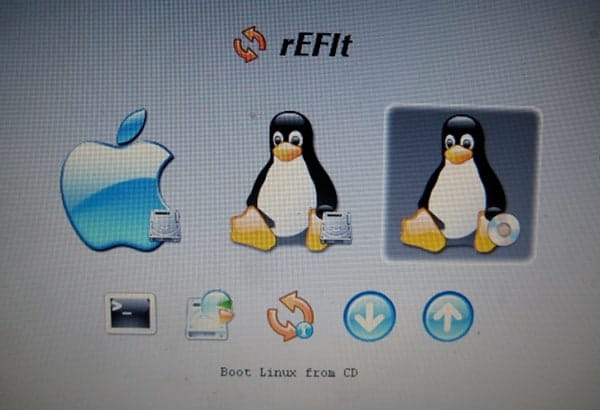
boot

Here is our trusty SystemRescueCd booting:
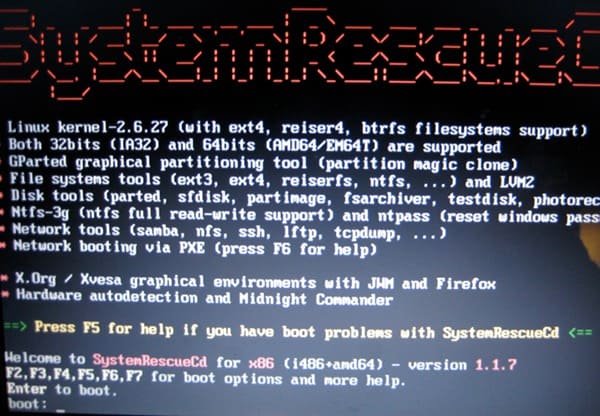
boot

After booting, use fdisk to delete the partition that was created (/dev/sda3 is what ours was), and create a slightly smaller one as well as a roughly 1 GB transfer disk. Create an ext2 filesystem on the large one (sda3 for us) and a VFAT file system on the smaller one. Copy the mcjrootfsmac03.0.tar.bz2 tarball to the smaller VFAT volume and extract it to the larger ext3 filesystem in the root:
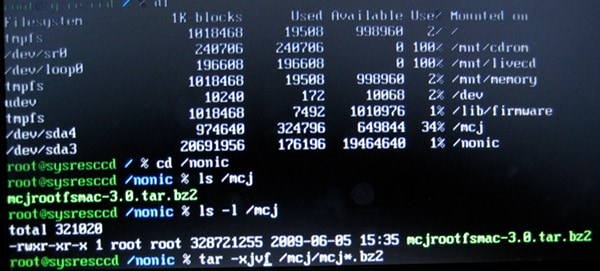
boot

After you have done this, enter chroot /nonic /bin/bash (or whatever your mount point is). If you aren't following along here, than this probably is not a task you should take on. Practice using a VM first. It is the same procedure, basically, but less scary. Note that like the Mac tarball, mcjrootfs-3.0.tar.bz2 can be used within VMWare Fusion. We have used this on version 2.0.4, and it boots fine with a SCSI driver.


1 | 2 | 3 | >4< | 5 | 6


People:
Places:
Things:
Times:


Please read our Terms of Use and our Privacy Policy
Microsoft, Windows, Windows XP, Windows 2003, Windows 2000, and NT are either trademarks or registered trademarks of Microsoft Corporation. NetAdminTools.com is not affiliated with Microsoft Corporation. Linux is a registered trademark of Linus Torvalds, and refers to the Linux kernel. The operating system of most distributions that contain the Linux kernel is GNU/Linux. All logos and trademarks in this site are property of their respective owner. Copyright 1997-2010 NetAdminTools.com


