
*The* significant point about LindowsOS is that you can buy preconfigured systems at Wal-Mart. Further, the systems are *cheap*. $199 for a PC with an OS installed. For GNU/Linux to be widely embraced as a desktop that is accessible by everyone, this is what needs to happen. We wondered just how easily Lindows was to operate, and contacted Lindows marketing for an eval copy. Lindows responded within a day with instructions on how to get a copy for our labs. This article will detail our experience installing Lindows.
We were quite interested in Lindows’ commitment to sharing the source per the terms of the GPL. At the bottom of MyLindows->MyProducts->MyDownloads, there was a link to an FTP site that had the source, and a decent fat pipe for a download. It appears that if you buy the product, the source is available. There are no instructions we see for compiling the collection of sources into a distribution, but, hey, that’s OK. The source for Lindows-specific tools is also available.
To see just how legit this source was, we picked a random Lindows tarball and extracted/compiled/ran it:
u-1@srv-1 linsource $ tar -xvzf lindowsos-initialstartup_0.0.1-8.tar.gz lindowsos-initialstartup/ lindowsos-initialstartup/po/ . . . lindowsos-initialstartup/stamp-h.in u-1@srv-1 linsource $ cd lindowsos-initialstartup u-1@srv-1 lindowsos-initialstartup $ ls CVS admin configure.files initialstartup.kdevprj Makefile.am autom4te.cache configure.in initialstartup.kdevses Makefile.dist config.guess configure.in.in po Makefile.in config.h.in debian stamp-h.in acinclude.m4 config.sub doc subdirs aclocal.m4 configure initialstartup u-1@srv-1 lindowsos-initialstartup $ ./configure checking build system type... i686-pc-linux-gnu checking host system type... i686-pc-linux-gnu . . . config.status: creating config.h config.status: executing default-1 commands u-1@srv-1 lindowsos-initialstartup $ make cd . \ && CONFIG_FILES= CONFIG_HEADERS=config.h \ /bin/sh ./config.status . . . make[2]: Leaving directory `/home/u-1/linsource/lindowsos-initialstartup' make[1]: Leaving directory `/home/u-1/linsource/lindowsos-initialstartup' u-1@srv-1 lindowsos-initialstartup $ cd initialstartup u-1@srv-1 initialstartup $ ls CVS initialstartup.moc.o Makefile initialstartup.o Makefile.am initialstartup_meta_unload.cpp Makefile.in initialstartup_meta_unload.o initialstartup lo16-app-initialstartup.png initialstartup.cpp lo32-app-initialstartup.png initialstartup.desktop main.cpp initialstartup.h main.o initialstartup.moc.cpp startup.sh u-1@srv-1 initialstartup $ ./initialstartup Creating link /home/u-1/.kde/socket-srv-1.signalq.com. Created link from "/home/u-1/.kde/socket-srv-1.signalq.com" to "/tmp/ksocket-u-1" u-1@srv-1 linsource $ tar -xvzf lindowsos-initialstartup_0.0.1-8.tar.gz lindowsos-initialstartup/ lindowsos-initialstartup/po/ . . . lindowsos-initialstartup/stamp-h.in u-1@srv-1 linsource $ cd lindowsos-initialstartup u-1@srv-1 lindowsos-initialstartup $ ls CVS admin configure.files initialstartup.kdevprj Makefile.am autom4te.cache configure.in initialstartup.kdevses Makefile.dist config.guess configure.in.in po Makefile.in config.h.in debian stamp-h.in acinclude.m4 config.sub doc subdirs aclocal.m4 configure initialstartup u-1@srv-1 lindowsos-initialstartup $ ./configure checking build system type... i686-pc-linux-gnu checking host system type... i686-pc-linux-gnu . . . config.status: creating config.h config.status: executing default-1 commands u-1@srv-1 lindowsos-initialstartup $ make cd . \ && CONFIG_FILES= CONFIG_HEADERS=config.h \ /bin/sh ./config.status . . . make[2]: Leaving directory `/home/u-1/linsource/lindowsos-initialstartup' make[1]: Leaving directory `/home/u-1/linsource/lindowsos-initialstartup' u-1@srv-1 lindowsos-initialstartup $ cd initialstartup u-1@srv-1 initialstartup $ ls CVS initialstartup.moc.o Makefile initialstartup.o Makefile.am initialstartup_meta_unload.cpp Makefile.in initialstartup_meta_unload.o initialstartup lo16-app-initialstartup.png initialstartup.cpp lo32-app-initialstartup.png initialstartup.desktop main.cpp initialstartup.h main.o initialstartup.moc.cpp startup.sh u-1@srv-1 initialstartup $ ./initialstartup Creating link /home/u-1/.kde/socket-srv-1.signalq.com. Created link from "/home/u-1/.kde/socket-srv-1.signalq.com" to "/tmp/ksocket-u-1" . . . |
Here is the output of the running program:
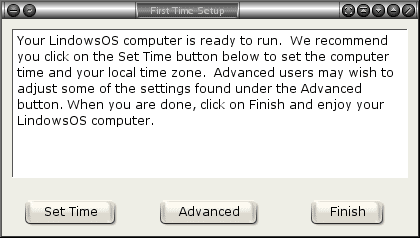
We downloaded the ISO image for version 3.0.5. There is a good page on what, exactly, to do with the ISO image here. Of course, the audience is not supposed to be familiar with GNU/Linux. We used:
cdrecord -speed=16 -v dev=ATAPI:0,0 lindowsos-3.0.5.iso |
to burn the ISO image.
There are some screenshots of the install procedure here.
During the installation, there was an option to not have a password for the system. We chose a password. There was no talk of users or administrative access, so we assume that this means the choices are to run as root with or without a password.
The install truly did take a few clicks of next, and a reboot to install the entire OS. There were very few questions. The only decisions to make, really, were whether or not there was a password, and whether or not to destroy all of the existing information on the hard disk. The install was faster than any Windows from 95 on up. No fooling!!!
On reboot, we hit a text-based logon. Since we had not entered any user names, we logged on as root with the same password we entered during setup. We then ran startx to get to the GUI. Hmmmm… negative points for this one. There is actually a blurb on the LindowsOS support site about logging in as root and running startx. At no time during the install or during boot were we asked about an IP address or networking configuration. We have a DHCP server on our lab network, and Lindows found this and configured everything correctly. Besides the text logon prompt, there is very little here that would confuse a new user.
After logging on, we were prompted to set the time (the same dialog box we compiled above), and we were ready to roll. The programs are accessed in “start menu” fashion. You add features (packages) by clicking on the “click and run” green runner icon. We just entered our email address/password, and selected the program we wanted. We chose sticky notes for our test install. Really, all this did was install the Debian package for Knotes, but the interface was pretty cool. In fact, from what we can tell, LindowsOS is simply Debian with a customized KDE desktop.
The ease of installation and package maintenance is LindowsOS’ reason for existence, and its strong points. We wouldn’t recommend LindowsOS for anybody with GNU/Linux experience. Red Hat is not that difficult to use with minimal GNU/Linux Experience. For the novice user, who wants an OS, but doesn’t want MS, LindowsOS is a good option.




