
NetAdminTools.com
 
SignalQ Sites:
NetAdminTools - Coprolite - NoNIC - SpotBridge - NAW
RoboCoop - AreWeDown - SolarPower - SysAdminTools
Xfig - Gold Loaf - GeekPapa - FixGMC - MCJ - FixRambler
Categories:
GNU/Linux | Homebrew designs | Perl | Administration | Backup/Recovery | Bugs/Fixes | Certification | Database | Email | File/Print | Hardware | Information Grab Bag | Interoperability | GNU/Linux ABCs | Monitoring | Name Resolution | Network Services | Networking | Remote Control | Security | Desktop | Web | BSD | Solaris | GIAGD | REALbasic

Last 30 Days | Last 60 Days | Last 90 Days | All Articles | RSS | Hail Support


Categories:
·GNU/Linux
·Homebrew designs
·Perl
·Administration
·Backup/Recovery
·Bugs/Fixes
·Certification
·Database
·Email
·File/Print
·Hardware
·Information Grab Bag
·Interoperability
·GNU/Linux ABCs
·Monitoring
·Name Resolution
·Network Services
·Networking
·Remote Control
·Security
·Desktop
·Web
·BSD
·Solaris
·GIAGD
·REALbasic
·All Categories


Updating the Flash PROM on Sun Ultra 2 Systems
Topic: Solaris   Posted:2003-01-23
Printer Friendly: Print

spacer
We have a dualie 300 Mhz Sun Ultra 2 that couldn't run 64 bit apps because the system firmware was so old. It turns out that not only does Sun have good documentation for this procedure, but that our system was even easier to upgrade than the documentation stated. Here are the details of our system:

$ uname -m
sun4u
$ uname -i
SUNW,Ultra-2

We went to this page at Sun, and ended up at this page, and followed the instructions. Do go to these pages, there is a lot of good info there. It turns out, though, that all we had to do was set a jumper on the motherboard, install Solaris 9, and say yes when asked if we wanted to upgrade our firmware. Of course, installing an OS isn't the easiest or safest way to upgrade the firmware, but we had to do this anyway. :)

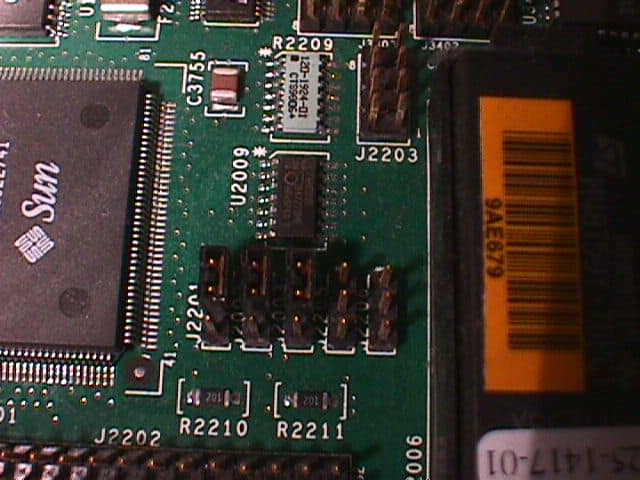
We took some pictures that may help you: Here is a picture of the jumper that needs to be changed in Read Only mode:


Here is a picture of the jumper that needs to be changed in Read/Write mode:
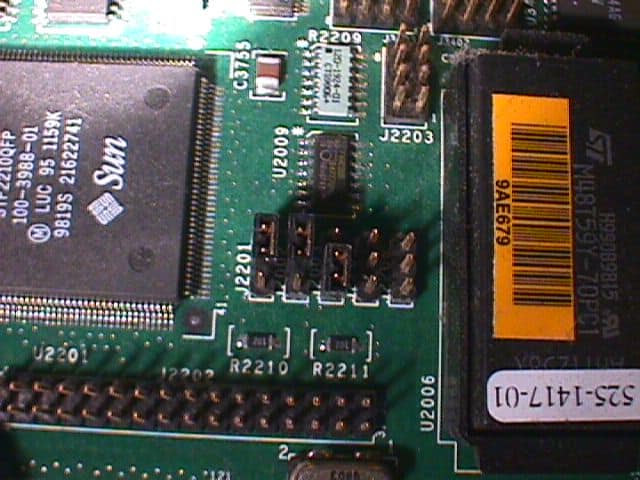


Set the jumper to Read/Write mode after the first reboot after the install. Turn the system off, of course. :) After the OS prompts for an upgrade, and you successfully update the firmware, shut down the machine, set the jumber back to Read Only, and boot up again. To verify that you are running in 64 bit mode:

$ isainfo -v
64-bit sparcv9 applications
32-bit sparc applications
$

Again, do follow the Sun documentation. If this is a production server, consider having your Sun service tech do the upgrade. This server is for our lab, and we can afford a mistake. For the scrappy, daring folk out there, this article may help you.





Please read our Terms of Use
Microsoft, Windows, Windows XP, Windows 2003, Windows 2000, and NT are either trademarks or registered trademarks of Microsoft Corporation. NetAdminTools.com is not affiliated with Microsoft Corporation. Linux is a registered trademark of Linus Torvalds, and refers to the Linux kernel. The operating system of most distributions that contain the Linux kernel is GNU/Linux. All logos and trademarks in this site are property of their respective owner. Copyright 1997-2008 NetAdminTools.com

Created by:
MCJ
MCJ CMS