
In addition to resolving NetBIOS names for small networks, the LMHOSTS file can be used to back up WINS. Since the cached entries are referred to first, you can manually reset the cache of a corrupt or missing domain by reloading the entries in the LMHOSTS file.
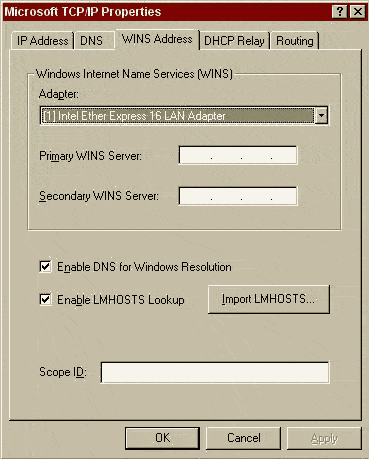
Make sure your system has the LMHOSTS checked on the WINS tab and has been restarted:
Let’s say we create an lmhosts file using the #PRE to load the values without any expiration time into the NBT cache.
D:\WINNT\system32\drivers\etc>type lmhosts
10.10.10.10 SAMPLEHOST#PRE #DOM: SAMPLEDOMAIN
D:\WINNT\system32\drivers\etc>nbtstat -c
No names in cache
Nbtstat -c lists the names in the cache. There are no entries, because the lmhosts file didn’t exist at bootup and no new connections have been cached temporarily. This is pretty slick, because you don’t have to do any extra configuration until later. Let’s reload the cache with the nbtstat -R command.
D:\WINNT\system32\drivers\etc>nbtstat -R
Successful purge and preload of the NBT Remote Cache Name Table.
D:\WINNT\system32\drivers\etc>nbtstat -c
Node IpAddress: [10.50.100.1] Scope Id: []
| NetBIOS Remote Cache Name Table | |||||
|---|---|---|---|---|---|
| Name | Type | Host Address | Life (sec) | ||
| SAMPLEHOST <03> | UNIQUE | 10.10.10.10 | -1 | ||
| SAMPLEHOST <00> | UNIQUE | 10.10.10.10 | -1 | ||
| SAMPLEHOST <20> | UNIQUE | 10.10.10.10 | -1 | ||
D:\WINNT\system32\drivers\etc>ping samplehost
Pinging samplehost [10.10.10.10] with 32 bytes of data:
Request timed out.
Request timed out.
^C
We have entered permanent cache entries for SAMPLEHOST. These entries will take priority over WINS, broadcasts, or DNS. If there are missing entries in your WINS database, or your WINS server is unavailable, you can force the correct entries into the cache with this method. You could keep this entry and add other key servers, or you could delete it when your WINS server is running again if you are concerned about maintaining LMHOSTS files.




