
NetAdminTools.com
 
SignalQ Sites:
NetAdminTools - Coprolite - NoNIC - SpotBridge - NAW
RoboCoop - AreWeDown - SolarPower - SysAdminTools
Xfig - Gold Loaf - GeekPapa - FixGMC - MCJ - FixRambler
Categories:
GNU/Linux | Homebrew designs | Perl | Administration | Backup/Recovery | Bugs/Fixes | Certification | Database | Email | File/Print | Hardware | Information Grab Bag | Interoperability | GNU/Linux ABCs | Monitoring | Name Resolution | Network Services | Networking | Remote Control | Security | Desktop | Web | BSD | Solaris | GIAGD | REALbasic

Last 30 Days | Last 60 Days | Last 90 Days | All Articles | RSS | Hail Support


Categories:
·GNU/Linux
·Homebrew designs
·Perl
·Administration
·Backup/Recovery
·Bugs/Fixes
·Certification
·Database
·Email
·File/Print
·Hardware
·Information Grab Bag
·Interoperability
·GNU/Linux ABCs
·Monitoring
·Name Resolution
·Network Services
·Networking
·Remote Control
·Security
·Desktop
·Web
·BSD
·Solaris
·GIAGD
·REALbasic
·All Categories


Remote Console Server and Web Administration Tool for NT
Topic: Remote Control   Posted:1998-05-01
Printer Friendly: Print

spacer
Two very useful remote administration tools are the Remote Console Server and the Web Administration tool. Both of these tools come on the NT 4.0 Server resource kit CD.

To install the Remote Console, go into control panel -> network -> services tab -> add -> remote access service, and point to the ..\..\netadmin\rconsole directory on the NT 4.0 Server resource kit CD. You will have to reboot the server for the remote console service to load.

Once the service is running, all you have to do is run the rclient.exe program:

rclient \\<servername>

and then you can run any commands as though you were at the console of the other machine. This is particularly useful if a server is really bogged down and you have to get on to stop some services because the console is not responding.

Note: The rconsole client that comes with the resource kit has a memory leak.  Get a new version at:
ftp://ftp.microsoft.com/bussys/winnt/winnt-public/reskit/nt40/i386

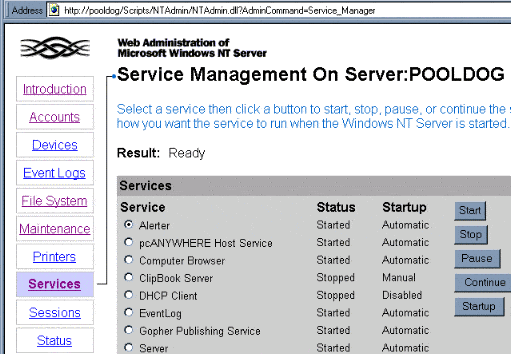
In the Webadmin directory on the NT 4.0 Server resource kit CD, just run the webadmin.exe program on a server with IIS. You can then connect to the server by using the URL <servername>/ntadmin/ntadmin.htm.  (There is an update for this, but we haven't tried it.)

Here is an example of the services section:
Make sure that you are very careful about security issues with this. There are obviously some large security risks associated with remote control, particularly when a webserver is involved.


Please read our Terms of Use
Microsoft, Windows, Windows XP, Windows 2003, Windows 2000, and NT are either trademarks or registered trademarks of Microsoft Corporation. NetAdminTools.com is not affiliated with Microsoft Corporation. Linux is a registered trademark of Linus Torvalds, and refers to the Linux kernel. The operating system of most distributions that contain the Linux kernel is GNU/Linux. All logos and trademarks in this site are property of their respective owner. Copyright 1997-2008 NetAdminTools.com

Created by:
MCJ
MCJ CMS




